How to Clean Data in SPSS
Clean data is the foundation of accurate statistical analysis. Before running t tests, ANOVA, chi-square, correlation, regression, reliability analysis, or factor analysis, the dataset must be checked carefully. If the data contains missing values, coding errors, duplicate cases, incorrect measurement levels, or outliers that have not been reviewed, the results can become misleading.
That is why learning how to clean data in SPSS is important for students, researchers, dissertation writers, and professionals working with survey data, questionnaire responses, experimental data, and secondary datasets. SPSS can run powerful procedures, but the quality of the output depends on the quality of the data entered into the software.
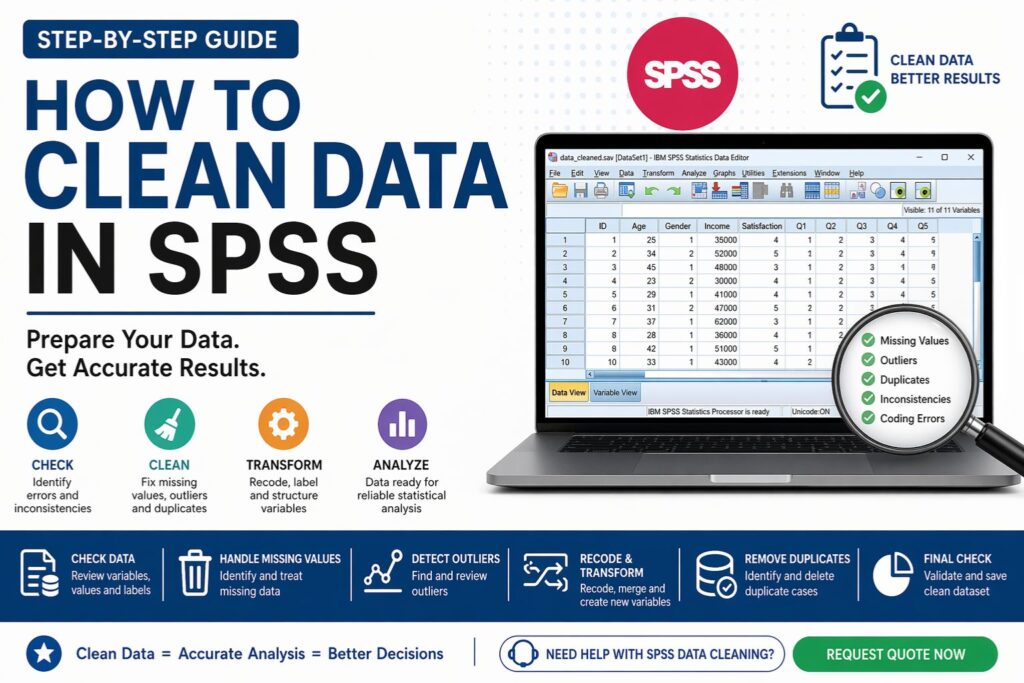
IBM explains that cleaning data involves reviewing problems in the data selected for analysis, including missing data, data errors, coding inconsistencies, and missing or poor metadata. A practical SPSS workflow also includes checking labels, missing values, outliers, measurement levels, duplicate responses, text responses, and saving a clean file, as outlined in this guide on how to clean data in SPSS.
If your dataset feels messy, inconsistent, or not ready for analysis, Request Quote Now for expert SPSS data cleaning support.
What Is Data Cleaning in SPSS?
Data cleaning in SPSS is the process of checking, correcting, and preparing a dataset before statistical analysis. It helps ensure that each variable is properly coded, each value makes sense, and each case is suitable for the analysis you plan to run.
A clean SPSS dataset should have clear variable names, accurate labels, correct value labels, defined missing values, appropriate measurement levels, reviewed outliers, and no duplicate or impossible entries. It should also be saved separately from the raw dataset so the original file remains unchanged.
This topic connects naturally with data analysis help, SPSS analysis help, descriptive statistics help, and how to interpret SPSS output because data cleaning comes before valid interpretation.
Why Data Cleaning Matters Before SPSS Analysis
SPSS will often run statistical tests even when the dataset contains errors. That is why the analyst must check the data first. A wrong code, missing value pattern, or unreviewed outlier can affect the entire analysis.
Table 1. Why Data Cleaning Matters in SPSS
| Data issue | Possible effect on analysis |
|---|---|
| Missing values | Reduces sample size or creates biased estimates |
| Wrong variable type | Affects available procedures and output accuracy |
| Duplicate cases | Overrepresents some responses |
| Outliers | Distorts means, regression, ANOVA, and correlation |
| Coding errors | Creates misleading categories or wrong scores |
| Poor labels | Makes tables and interpretation unclear |
| Reverse-coded item errors | Weakens reliability and scale scores |
A strong analysis starts with a dataset that has been checked properly. Clean data makes the results easier to interpret, easier to report, and easier to defend.
Step 1: Save a Raw Copy Before Cleaning
Before making changes, save a copy of the original dataset. Never overwrite the raw file.
| File name | Purpose |
|---|---|
survey_raw.sav |
Original untouched dataset |
survey_cleaned.sav |
Working cleaned dataset |
survey_final_analysis.sav |
Final analysis-ready file |
This protects your work and creates a clear audit trail. If a supervisor, client, or reviewer asks what was changed, you can compare the raw and cleaned versions.
Step 2: Check Variable Names, Labels, and Value Labels
Open Variable View in SPSS and review the structure of the dataset. Each variable should have a clear name, meaningful label, correct type, and appropriate value labels.
Instead of unclear names such as Q1, Q2, or VAR0003, use clearer names such as age, gender, job_satisfaction, income_level, or purchase_intention.
Table 2. Variable Setup Checklist in SPSS
| Item to check | What to confirm |
|---|---|
| Name | Short and clear variable name |
| Label | Full description of the variable |
| Type | Numeric, string, date, or other correct format |
| Values | Category labels are assigned correctly |
| Missing | Missing value codes are defined |
| Measure | Nominal, ordinal, or scale |
| Decimals | Appropriate number of decimal places |
This step improves the clarity of SPSS output and makes later reporting much easier.
Step 3: Identify Missing Data
Missing data is common in survey and research datasets. Respondents may skip questions, files may import with blanks, or certain missing responses may be coded as 99, 999, N/A, or another placeholder.
In SPSS, missing data can be checked using:
Analyze → Descriptive Statistics → Frequencies
IBM notes that missing data may be handled by excluding rows or characteristics, or by filling blanks with estimated values, depending on the problem and analysis goal.
Table 3. Common Ways to Handle Missing Data
| Method | Best used when |
|---|---|
| Leave as system missing | Missing values are limited and acceptable |
| Define user-missing values | Codes such as 99 or 999 represent missing data |
| Listwise deletion | Missing data is small and unlikely to bias results |
| Mean or median replacement | Only for limited cases and suitable scale variables |
| Multiple imputation | Missing data is more complex and needs advanced handling |
Missing data should not be deleted automatically. The right approach depends on how much is missing, why it is missing, and which analysis will be performed.
Step 4: Check for Data Entry Errors
Data entry errors are values that do not make sense. These errors can appear in manually entered datasets, imported Excel files, Google Forms exports, Qualtrics downloads, or merged datasets.
Examples include age recorded as 250, gender coded as 7 when only 1 and 2 are valid, a Likert response of 9 on a 1–5 scale, or a date entered in the wrong format.
Table 4. Examples of Data Entry Errors
| Variable | Valid values expected | Example of a data entry error | Why it is a problem |
|---|---|---|---|
| Gender | 1 = Male, 2 = Female | 5 | The value is outside the defined categories |
| Likert item | 1, 2, 3, 4, or 5 | 9 | The value is outside the scale range |
| Age | 18 to 70 | 300 | The age is unrealistic for the sample |
| Employment status | 1 = Employed, 2 = Unemployed | Full-time | Text was entered where a numeric code was expected |
| Education level | 1 = High school, 2 = Diploma, 3 = Bachelor’s, 4 = Postgraduate | 99 | The value was not defined as a valid or missing code |
Frequency tables are one of the quickest ways to detect unusual values.
Step 5: Check Measurement Levels
SPSS classifies variables as nominal, ordinal, or scale. This matters because the measurement level affects which statistical test is appropriate.
Table 5. Measurement Levels in SPSS
| Measurement level | Example | Common use |
|---|---|---|
| Nominal | Gender, region, department | Frequencies, chi-square |
| Ordinal | Likert item, education level | Frequencies, nonparametric tests |
| Scale | Age, income, total score | t test, ANOVA, correlation, regression |
If the measurement level is wrong, the analysis may still run, but the interpretation may be weak or incorrect. This is especially important for questionnaire data, Likert scale data, and dissertation datasets.
Step 6: Recode Variables Correctly
Recoding is needed when categories must be grouped, reversed, corrected, or converted into a format suitable for analysis. You may need to group age into categories, reverse-code negatively worded Likert items, or convert text responses into numeric codes.
The safer SPSS route is usually:
Transform → Recode into Different Variables
This keeps the original variable unchanged while creating a new cleaned variable.
Table 6. Common Recoding Tasks in SPSS
| Recoding task | Example |
|---|---|
| Group continuous values | Age into age groups |
| Reverse-code items | 1 becomes 5, 2 becomes 4 |
| Convert text to numbers | Male = 1, Female = 2 |
| Merge small categories | Combine rare response options |
| Define missing codes | 99 becomes missing |
For a deeper walkthrough, see how to recode variables in SPSS.
Step 7: Detect and Review Outliers
Outliers are values that are very different from the rest of the data. They are not always errors, but they must be reviewed because they can affect means, standard deviations, correlations, regression coefficients, and ANOVA results.
SPSS can help detect outliers using boxplots, Explore, Descriptives, and standardized z-scores.
Table 7. Ways to Detect Outliers in SPSS
| Method | What it shows |
|---|---|
| Boxplot | Visual display of extreme values |
| Z-scores | Standardized distance from the mean |
| Descriptives | Minimum and maximum values |
| Explore | Outlier cases and distribution checks |
Do not remove outliers automatically. First check whether the value is a valid observation, a data entry mistake, or an impossible value.
Step 8: Check for Duplicate Cases
Duplicate cases can occur when a respondent submits a survey more than once, files are merged incorrectly, or copied rows remain in the dataset.
In SPSS, use:
Data → Identify Duplicate Cases
Duplicates should be reviewed carefully. Sometimes one duplicate should be removed. In other cases, what looks like a duplicate may be a valid repeated measurement. The correct decision depends on the study design.
Step 9: Check Consistency Across Variables
Some values look valid alone but do not make sense when compared with other variables.
For example, a respondent reports age as 12 but education as postgraduate. Another selects “unemployed” but reports full-time monthly income. Another says they have never used a service but rates satisfaction with that service.
These inconsistencies should be flagged and reviewed before analysis. Good data cleaning requires judgment, not only SPSS commands.
Step 10: Review Likert Scale Items and Composite Scores
Many research projects use several questionnaire items to measure one construct, such as job satisfaction, academic motivation, customer loyalty, anxiety, trust, or perceived usefulness.
Before creating a composite score, check that all items are coded in the same direction. Negatively worded items may need reverse coding. After that, reliability analysis help may be needed before calculating a mean or total score.
Table 8. Likert Scale Cleaning Checklist
| Task | Why it matters |
|---|---|
| Check value labels | Confirms that 1–5 or 1–7 scales are correctly defined |
| Review missing values | Prevents incomplete scale scores |
| Reverse-code negative items | Aligns item direction |
| Check reliability | Confirms scale consistency |
| Create composite score | Produces analysis-ready variable |
If your study uses questionnaires, you may also need Likert scale analysis help or questionnaire data analysis help.
Step 11: Run Final Descriptive Screening
After cleaning missing values, coding errors, outliers, duplicates, and inconsistencies, run descriptive statistics again. This confirms that the dataset is ready for analysis.
Review frequencies, percentages, means, standard deviations, minimum and maximum values, histograms, boxplots, and normality indicators where needed.
This final screening helps confirm that the cleaned file is stable and analysis-ready. It also prepares the data for hypothesis testing help, regression analysis help, or Chapter 4 results help.
Step 12: Document the Cleaning Process
A strong research project does not only clean data. It documents what was cleaned and why. This improves transparency and helps with dissertation methodology sections, client reporting, and reproducibility.
Table 9. Data Cleaning Documentation Template
| Cleaning action | Example note |
|---|---|
| Missing data check | Three cases had missing responses on key variables |
| Recoding | Age was grouped into four age categories |
| Outlier review | Two extreme values were checked and retained |
| Duplicate check | One duplicate response was removed |
| Reverse coding | Three negatively worded items were reverse-coded |
| Clean file saved | Final dataset saved as survey_cleaned.sav |
This documentation can also support your methodology chapter, results chapter, or final analysis report.
Complete SPSS Data Cleaning Checklist
Table 10. SPSS Data Cleaning Checklist
| Step | Completed? |
|---|---|
| Saved raw dataset copy | ☐ |
| Checked variable names and labels | ☐ |
| Defined value labels | ☐ |
| Checked measurement levels | ☐ |
| Identified missing data | ☐ |
| Corrected invalid values | ☐ |
| Reviewed outliers | ☐ |
| Checked duplicate cases | ☐ |
| Reviewed consistency across variables | ☐ |
| Recoded variables where needed | ☐ |
| Reverse-coded items where needed | ☐ |
| Created composite scores correctly | ☐ |
| Ran final descriptive screening | ☐ |
| Saved cleaned dataset | ☐ |
| Documented cleaning decisions | ☐ |
Clean vs Unclean Data in SPSS
Table 11. Before and After Data Cleaning
| Area | Before cleaning | After cleaning |
|---|---|---|
| Variable labels | Unclear or missing | Clear and meaningful |
| Missing values | Unknown or poorly coded | Identified and handled |
| Outliers | Not reviewed | Checked and documented |
| Duplicate cases | May remain in dataset | Identified and resolved |
| Likert items | May include reverse-coded errors | Properly aligned |
| Analysis readiness | Uncertain | Ready for valid testing |
This is why data cleaning should never be rushed. It protects every result that comes after it.
Common Mistakes When Cleaning Data in SPSS
One common mistake is deleting missing data without checking how much is missing or why it is missing. Another is removing outliers simply because they look extreme, even when they are valid observations. Some students also forget to define value labels, which makes SPSS output harder to interpret.
Another common problem is reverse-coding Likert items incorrectly. This can damage reliability and create wrong composite scores. Duplicates, inconsistent values, and poorly formatted imported data are also frequent issues.
A strong cleaning process avoids these mistakes and prepares the dataset for accurate analysis.
Get Expert Help Cleaning Data in SPSS
Some datasets are simple. Others require careful review before analysis can begin. If your data came from a questionnaire, Excel file, Google Forms, Qualtrics, secondary dataset, or manual entry, it may need cleaning before any statistical test is valid.
Expert support can include data screening, missing value checks, outlier detection, duplicate case review, variable coding, reverse coding, composite score creation, SPSS file preparation, final cleaned dataset delivery, and analysis-ready reporting.
If you want your dataset cleaned properly before analysis, Request Quote Now.
Why Choose Statistical Analysis Help
Statistical Analysis Help supports students, researchers, and professionals who need clean, accurate, and analysis-ready datasets. The focus is not only on running SPSS tests but also on preparing the dataset correctly so the results are valid and easy to interpret.
Support can continue from cleaning to dissertation data analysis help, SPSS analysis help, data analysis help, and Chapter 4 results help.
If your data is not ready, your results are not ready. Clean data first, analyze with confidence after.
FAQ: How to Clean Data in SPSS
What is data cleaning in SPSS?
Data cleaning in SPSS is the process of checking and correcting problems in a dataset before analysis. It includes missing values, coding errors, duplicate cases, outliers, incorrect variable types, and inconsistent responses.
Why is data cleaning important before analysis?
Data cleaning is important because errors in the dataset can lead to inaccurate results. Clean data makes statistical tests more reliable and improves interpretation.
How do I check missing data in SPSS?
You can check missing data using Frequencies, Descriptives, Explore, or Missing Value Analysis. Frequency tables are often the easiest starting point for survey data.
Should I delete missing values in SPSS?
Not always. Missing values should be reviewed first. Sometimes deletion is acceptable, but in other cases imputation or another missing data strategy may be better.
How do I find outliers in SPSS?
Outliers can be found using boxplots, Explore, Descriptives, or standardized z-scores. Each outlier should be reviewed before deciding whether to keep or remove it.
Can SPSS clean data automatically?
SPSS provides tools for finding problems, recoding variables, identifying duplicates, and reviewing missing values. However, cleaning still requires human judgment because not every unusual value is wrong.
How do I clean Likert scale data in SPSS?
Check that all items use the same coding direction, reverse-code negatively worded items, define value labels, review missing data, and test reliability before creating composite scores.
Should I save a separate cleaned dataset?
Yes. Always keep the raw file and save a separate cleaned version. This protects the original data and makes your cleaning decisions easier to document.
What happens if I analyze unclean data?
Unclean data can produce wrong statistical results, weak interpretation, misleading conclusions, and unnecessary revisions.
Can you help clean my SPSS dataset?
Yes. Statistical Analysis Help can review, clean, prepare, and structure your SPSS dataset so it is ready for accurate analysis and reporting.
Final Call to Action
Data cleaning is not a small technical step. It is the foundation of accurate SPSS analysis. A clean dataset gives you stronger results, clearer interpretation, and more confidence when writing your dissertation, thesis, assignment, report, or journal paper.
If you need help cleaning your SPSS dataset, correcting errors, handling missing values, checking outliers, or preparing variables for analysis, get expert support today.